

Titan 740ix Digital Parts for Controls, Pump and Cart Service
Find genuine Titan OEM replacement components for your Titan 740ix Digital Airless Sprayer. Browse dedicated assembly diagrams to identify parts, check ordering references and prepare an accurate purchase for your installed equipment.
Start with the Correct Digital Model Diagram
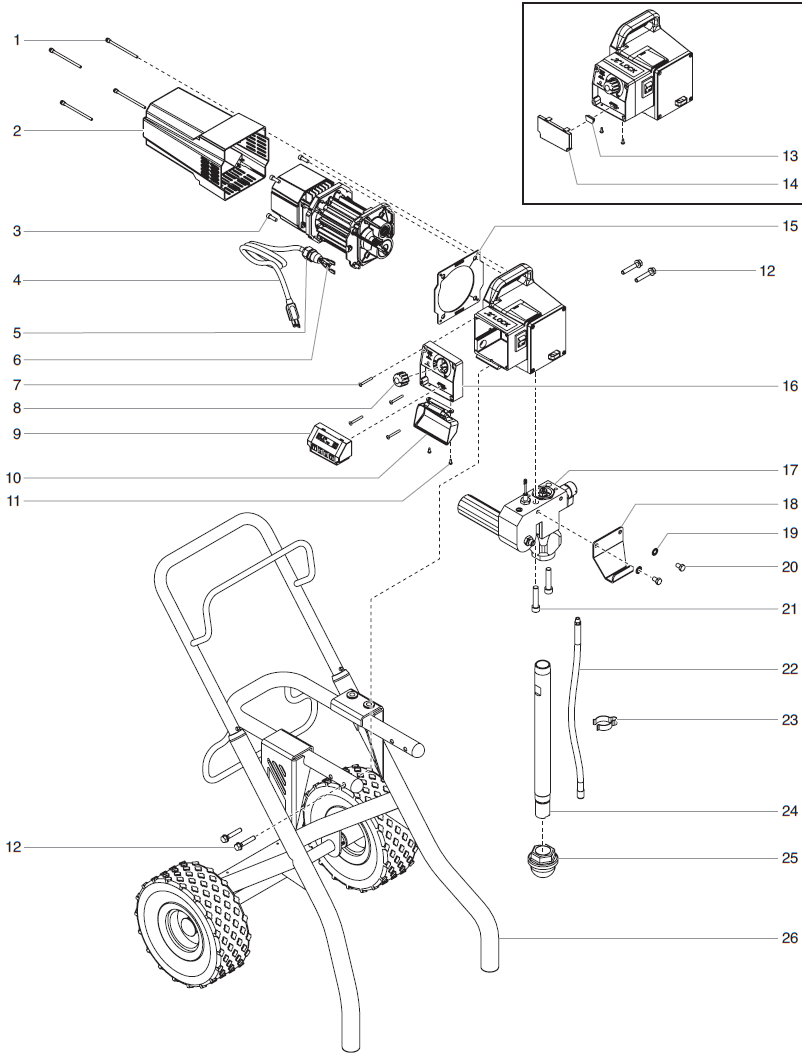
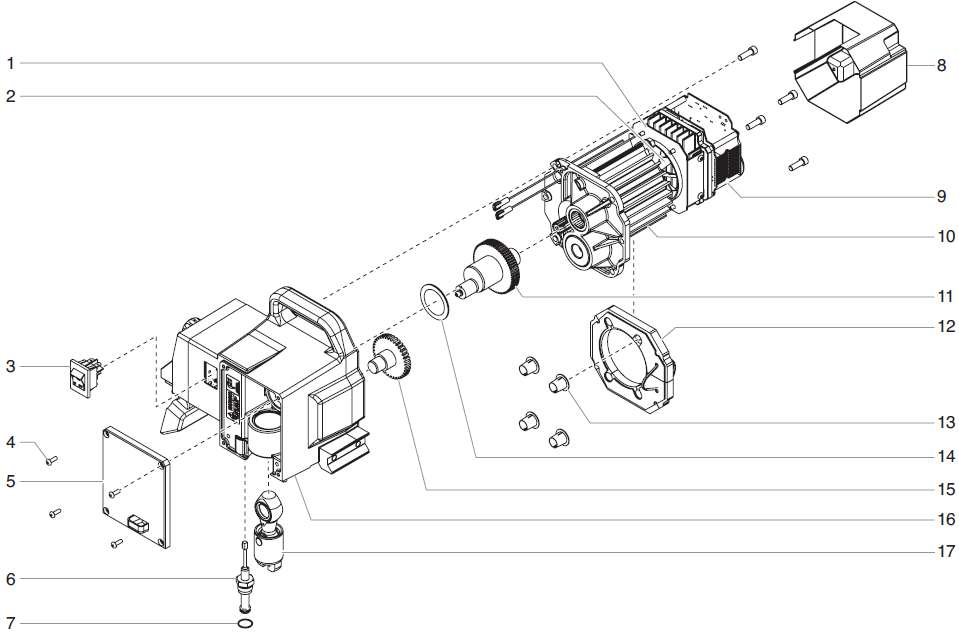
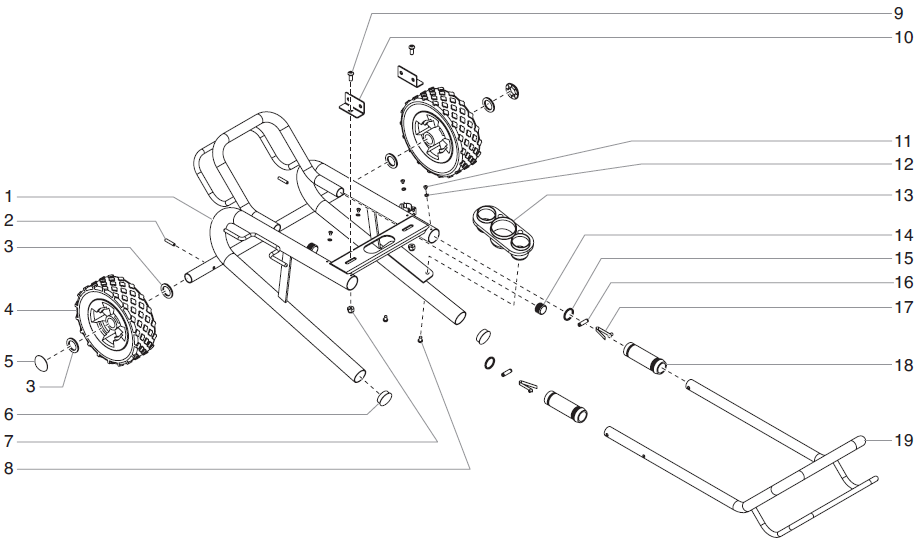
Identify the assembly being serviced, then compare its diagram with your sprayer. Use the numbered callout to locate the Titan part number in the accompanying list. Keep your model, serial number, electrical configuration and cart arrangement available when confirming fitment.
1. Identify Your Equipment
Confirm the Digital model designation and record the serial number before selecting parts documentation.
2. Choose an Assembly
Open the category that corresponds to the component’s location on your machine.
3. Match the Part Number
Read the diagram and parts list together. Diagram positions identify locations; part numbers identify orderable items.
4. Review Your Selection
Check compatibility notes, replacement references, included contents and required quantities before ordering.
Shop Titan 740ix Digital Parts by Assembly
Digital Main Assembly
Locate listed components including the Xact Digital Control Assembly, control system cover, control knob, power cord and mounting hardware. Verify electrical parts against the installed equipment.
Browse Digital Main Assembly PartsHigh Rider Cart Assembly
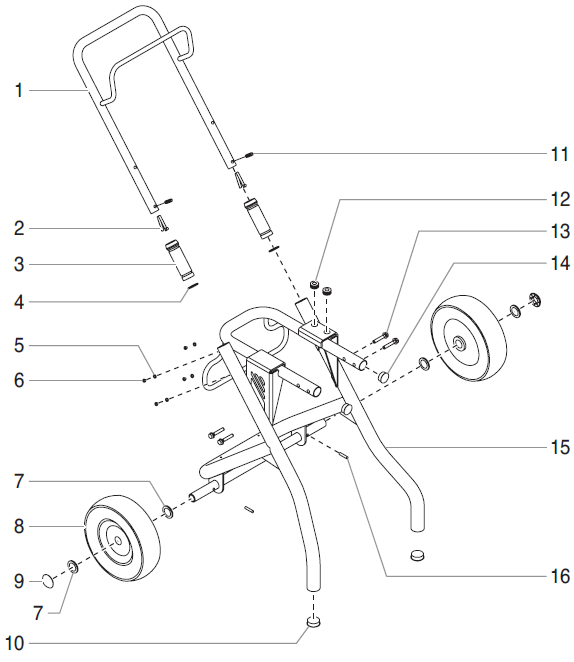
Explore the High Rider cart category referenced as P/N 704-415. Compare the installed cart with its diagram before selecting replacement components and hardware.
Browse Digital High Rider Cart PartsSiphon Assembly
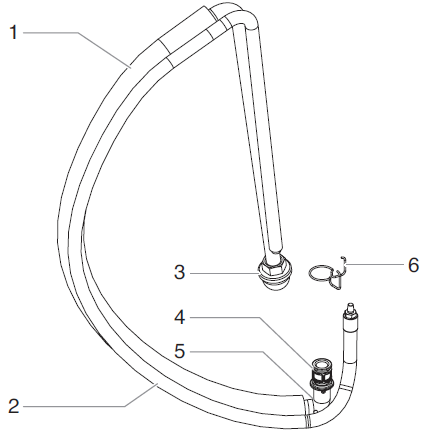
Use the siphon assembly diagram when identifying intake and return components. Match the existing arrangement and connections to the applicable parts references.
Browse Digital Siphon PartsFluid Section Assembly
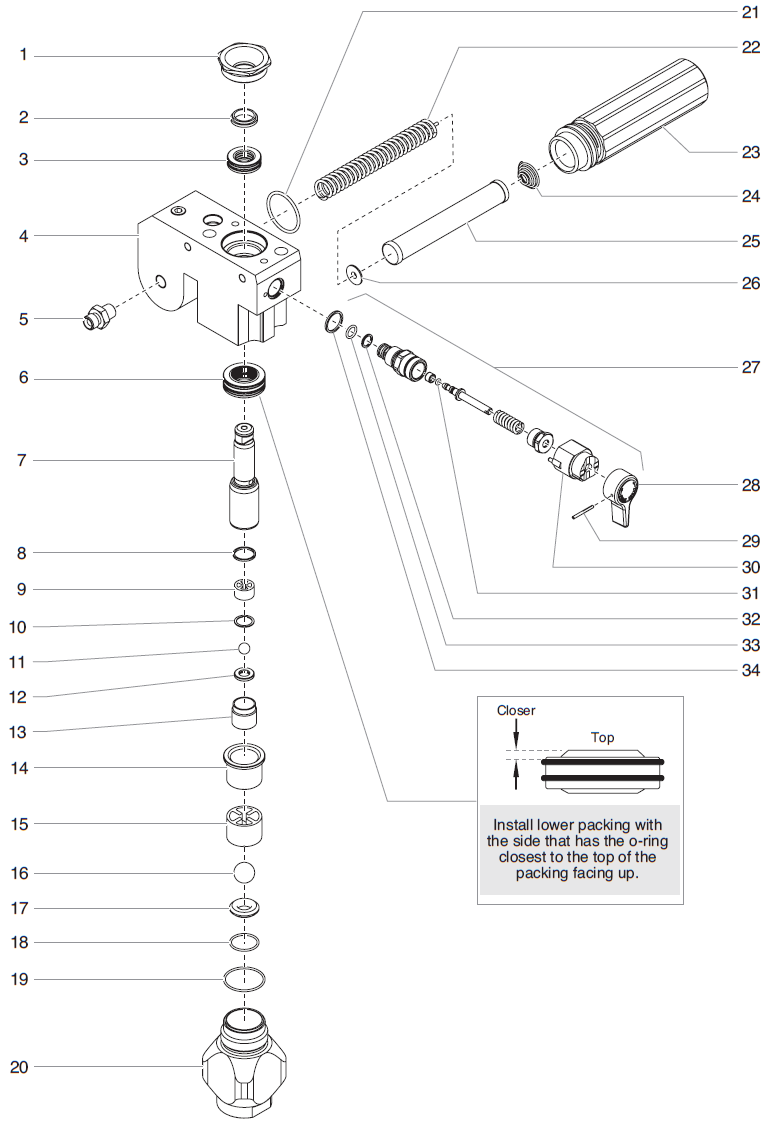
Consult the dedicated fluid section category when planning pump service. Confirm the installed pump and individual component numbers before purchasing replacement parts.
Browse Digital Fluid Section PartsDrive Assembly
Review the Digital drive assembly diagram to identify the required component and ordering number. Check applicable service documentation when planning drive or electrical repairs.
Browse Digital Drive Assembly PartsLow Rider Cart Assembly
Find the Low Rider cart category referenced as P/N 704-583. Match configuration-specific components and required quantities to your existing cart.
Browse Digital Low Rider Cart PartsAccessories
Explore accessories linked from the Digital model catalog. Review individual product specifications for suitable connections and operating requirements before purchasing.
Browse 740ix Digital AccessoriesCheck Fitment Before Completing Your Order
| Ordering Detail | What to Confirm |
|---|---|
| Model and serial number | Use documentation applicable to your Digital model and equipment version. |
| Digital controls and electrical parts | Match the installed component, electrical configuration and specified replacement number. |
| Pump and intake arrangement | Compare existing assemblies and connections with the relevant diagrams. |
| Cart configuration | Check High Rider P/N 704-415 or Low Rider P/N 704-583 references as applicable. |
| Package contents and quantity | Identify included components and any items that require separate purchases. |
An assembly diagram shows component locations and relationships. It does not establish that every illustrated item is included with one part, kit or assembly purchase.
Featured Component: Titan 704-469 Xact Digital Control Assembly
Titan 704-469 Xact Digital Control Assembly appears in the 740ix Digital main assembly catalog. If diagnosis identifies this component as requiring replacement, confirm the installed control assembly and applicable parts documentation before ordering.
View Titan 704-469 Xact Digital Control AssemblyPrepare for Repairs with the Correct Service Reference
Diagnose operating problems using the applicable Titan manual before purchasing replacement components. Starting difficulties, pressure changes, display problems or unusual noise can have several causes. Use inspection findings to establish the required repair, then identify the components through the relevant diagram.
Complete the manufacturer’s prescribed pressure-relief procedure and disconnect electrical power before maintenance. Follow the documented service instructions and use a qualified technician for electrical or internal repairs when required.
Confirm compatibility through part numbers and equipment documentation. Similar model names, including 740i, 740ix and 740ix Digital, do not establish interchangeability of controls, drive components or cart parts.
Build Your Titan 740ix Digital Parts Order
Select an assembly above to locate your replacement component. For identification assistance, have your model, serial number, installed configuration and existing part number ready.
Call 713-931-0006 for Parts AssistanceFrequently Asked Questions
How do I identify the correct Titan 740ix Digital replacement part?
Check your model, serial number and installed configuration. Open the relevant Digital model assembly diagram, match its callout to the listed Titan part number, and review compatibility notes before ordering.
Which parts categories are available for the 740ix Digital?
The catalog includes Digital main, High Rider cart, siphon, fluid section, drive, Low Rider cart and accessories categories.
What references identify the Digital model cart assemblies?
The catalog references High Rider cart P/N 704-415 and Low Rider cart assembly P/N 704-583. Match replacement components to the cart installed on your sprayer.
Is Titan 704-469 listed for the 740ix Digital?
Yes. Titan 704-469 Xact Digital Control Assembly appears in the Digital main assembly parts list. Confirm the installed control assembly and applicable documentation before purchasing.
Does one purchase include every component shown in an assembly diagram?
Review the selected product listing for included components and quantities. Some items illustrated in an assembly diagram are sold separately and may not be included with your purchase.