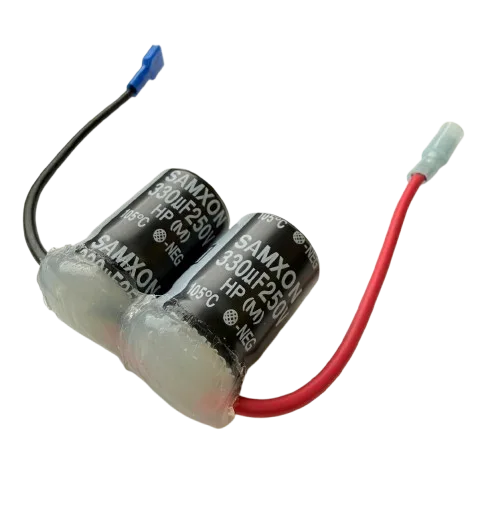
Titan 704-206 Capacitor Assembly
This Titan 704-206 capacitor assembly is a direct replacement electrical component designed for use on compatible Advantage, Impact, and RentSpray equipment. It stores and releases electrical energy to start and run the motor, providing the necessary torque for reliable operation. Replacing a failed or weak capacitor restores proper motor starting and running performance, preventing overheating and premature motor failure.
| Part Number | 704-206 |
|---|---|
| Part Description | Capacitor Assembly |
| Brand | Advantage, Impact, RentSpray |
| Compatible Models | Advantage: 400 Impact: 410 RentSpray: 500 |
| Condition | New |
Titan 704-206 Capacitor Assembly for Advantage, Impact & RentSpray
The Titan 704-206 Capacitor Assembly is a genuine Titan-manufactured replacement electrical component designed for use on compatible Advantage, Impact, and RentSpray equipment. This capacitor stores electrical energy and releases it during motor startup to provide the necessary torque to overcome inertia, then continues to support efficient motor running operation.
Over time, capacitors can degrade due to heat, age, voltage fluctuations, or repeated use. A failing capacitor may cause the motor to start slowly, hum without starting, overheat, or fail to start altogether. Replacing a worn or failed capacitor with this genuine Titan component restores proper motor operation, prevents electrical stress on other components, and extends the service life of your equipment.
What it does and when to replace it
| Motor starting | Provides initial surge of power to start the motor |
|---|---|
| Motor running | Helps maintain efficient motor operation under load |
| Power factor correction | Improves electrical efficiency and reduces current draw |
| Motor won't start | Motor hums but doesn't rotate or fails to start |
|---|---|
| Slow starting | Motor takes longer than normal to reach full speed |
| Overheating | Motor runs hot or thermal overload trips frequently |
| Physical damage | Bulging, leaking, or corroded capacitor housing |
Specifications
| Capacitor Type | Motor Run/Start Capacitor |
|---|---|
| Configuration | Assembly with mounting bracket and leads |
| Termination | Quick-connect terminals |
| Condition | New |
Compatibility
This Titan 704-206 capacitor assembly is designed for use on the following models. Always confirm fitment using the correct parts diagram for your exact model and revision.
| Brand | Compatible Models |
|---|---|
| Advantage | 400 |
| Impact | 410 |
| RentSpray | 500 |
Related parts commonly serviced together
When replacing the capacitor assembly, these associated components are often inspected or replaced to ensure a complete repair.
Inspect motor windings and bearings for damage; replace if faulty.
Check switch contacts for pitting or burning; replace if defective.
Inspect for loose, corroded, or damaged connections; repair as needed.
Frequently Asked Questions
No reviews yet. Be the first to review this product!