

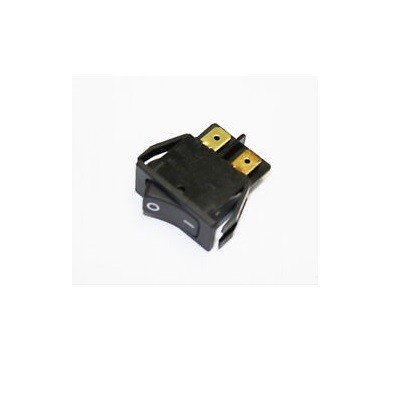

SprayTech part 0275555 is a rocker power switch used to control the main power supply to the SprayTech Airless EP2105 sprayer. This switch provides reliable on/off operation, allowing the user to safely start and stop the machine. Replacing a worn, intermittent, or failed switch restores proper machine control and safe operation.
| Part Number | 0275555 |
|---|---|
| Part Description | Rocker Power Switch |
| Brand | SprayTech |
| Fits | SprayTech Airless EP2105 |
| Condition | New |
Components: This is a single rocker switch; no additional parts are included.
The SprayTech 0275555 rocker power switch is a genuine OEM replacement switch for the SprayTech Airless EP2105 sprayer. It serves as the main power control, allowing the operator to turn the unit on and off with a simple rocker action. This switch is designed to handle the electrical load of the sprayer and provides reliable, long‑lasting service.
Over time, switches can wear out due to repeated use, arcing, or moisture ingress. A failing switch may cause intermittent operation, failure to start, or inability to shut off the machine. Replacing a faulty switch with OEM part 0275555 restores proper control and helps ensure safe operation.
| Power control | Provides reliable on/off switching for the sprayer's main power supply |
|---|---|
| Safety | Allows operator to quickly disconnect power in an emergency |
| Electrical protection | When functioning properly, helps protect internal components from unintended power cycles |
| Intermittent operation | Sprayer starts inconsistently or shuts off unexpectedly |
|---|---|
| No power | Sprayer will not turn on despite known good power source |
| Stuck or loose rocker | Switch feels stuck, loose, or does not click positively |
| Visible damage | Melted housing, burnt terminals, or discoloration from overheating |
Part 0275555 is specifically designed for the SprayTech Airless EP2105 sprayer. Verify fitment using your machine's parts diagram.
| Brand / Model | Component |
|---|---|
| SprayTech Airless EP2105 | Rocker Power Switch |
When replacing the power switch, it is advisable to inspect related electrical components for signs of wear or damage.
Inspect for cuts, fraying, or loose connections that could mimic switch failure.
Check for loose, corroded, or burnt connections at the switch and motor.
A tripped breaker or blown fuse can cause loss of power; verify before replacing the switch.
Copyright © 2024 AlltitanParts.com - All Rights Reserved.
