Titan 9841504 Snap Button
OEM Titan Control Component
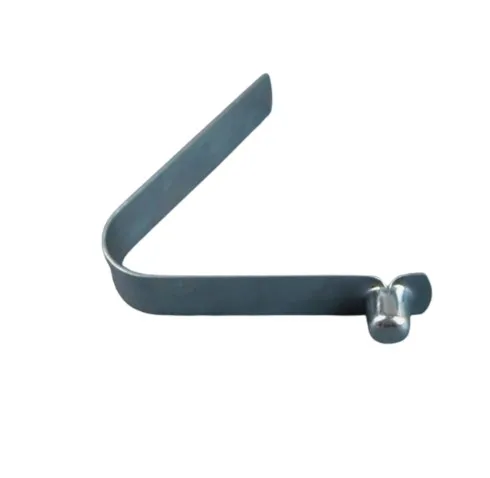
Titan 9841504 Snap Button is an OEM spring-loaded push button used for control functions across a wide range of Titan and SprayTech sprayers. It provides reliable latching or momentary actuation with positive tactile feedback.
Compatibility Table
OEM snap button restores proper switch feel and reliable control function on compatible Titan and SprayTech spray systems.
Titan Control Component Replacement
Titan 9841504 Snap Button for Compatible Titan & SprayTech Sprayers
Titan 9841504 is a genuine OEM spring-loaded snap button used across a wide range of Titan and SprayTech sprayers. This component provides a tactile, reliable actuation point for control functions such as trigger locks, mode selectors, and other mechanical interfaces. It is commonly found on handle assemblies, control panels, and cart frames.
| Detail | Technical / Commercial Information |
|---|---|
| Product Overview | OEM Titan 9841504 snap button. A spring-loaded component used for latching or momentary actuation across a wide range of Titan and SprayTech sprayers. |
| Function | Provides a tactile, reliable actuation point for control functions such as trigger locks, mode selectors, and handle mechanisms. The button offers positive tactile feedback, clicking to confirm activation, and returns to its original position via spring tension. |
| Replacement Indicators | Signs that replacement is needed include sticky or stuck operation, no click feedback or loss of spring tension, visible cracks or damage to the housing, and a button that is missing entirely. |
| Service Guidance | Clean the mounting hole of any debris. Press the snap button firmly until it clicks into place. Test the button function before reassembling the control panel. Replace the button if it feels sticky or does not return to its original position. Lubrication may provide temporary relief, but if the button is worn, cracked, or has lost spring tension, replacement is the only permanent solution. |
| Industrial Applications | Professional painting, line striping, and any application requiring reliable mechanical control actuation on Titan/SprayTech sprayers. |
| Compatible Models | Advantage 400-1100, Advantage GPX models, Elite 3500, Impact 440/540/640/740/840, PowrBeast 4700/7700/9700, PowrTwin 4900/6900/8900/12000 Plus DI, PowrLiner 8900/9900XLT, RentSpray 500/600, SprayTech Advantage EPX series, SprayTech EP/EPX series, SprayTech GPX models [citation:1]. |
| Accurate Part Number | 9841504 Snap Button. |
| Related Parts Commonly Serviced Together | 590-504 Handle Sleeve, 590-506 Handle Washer, 590-508 Roll Pin, 0295610 Roll Pin [citation:8][citation:10]. |
| Common Problems Solved | Unresponsive controls, sticky or stuck buttons, loss of tactile feedback, safety interlock failure. |
| Use with Coating Systems | Supports all coatings used with compatible Titan and SprayTech systems. |
| OEM & Brand Information | Genuine Titan OEM component. |
| Commercial Benefits | Restores proper switch feel and reliable control function, prevents unresponsive controls, and maintains safe equipment operation. |
The 9841504 Snap Button is a genuine OEM component for compatible Titan and SprayTech spray systems. Over time, snap buttons can become sticky from dried paint, lose spring tension, crack from impact, or fail due to corrosion. A faulty button can prevent equipment from starting, cause accidental operation, or make control functions unpredictable. Replacing with OEM Titan 9841504 restores proper switch feel, reliable actuation, and safe operation. This part fits a wide range of models including the Advantage series, Impact series, PowrTwin series, PowrLiner series, and SprayTech EPX/GPX models. It is not listed as a component for the Commander air-powered airless sprayer. Refer to your product manual for detailed information about this component and its compatibility with your specific equipment.
FAQ Section
Quick contractor-focused answers for confirming fitment, function, and service value.
No reviews yet. Be the first to review this product!